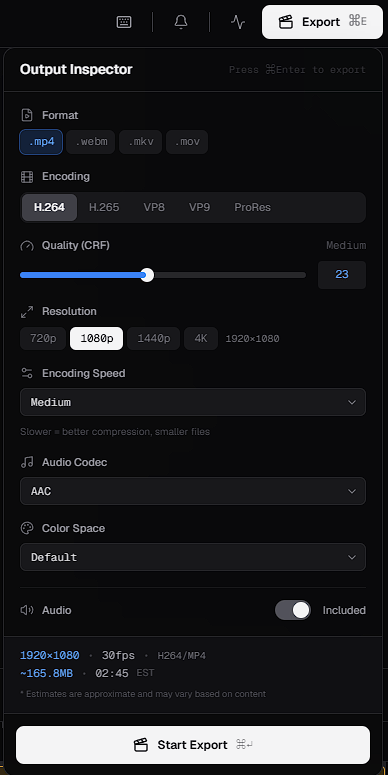
The Output Inspector gives you detailed control over your exported video. If you’re not sure what to choose, start with the recommended settings below.
The Output Inspector, with settings for format, encoding, quality (CRF), resolution, encoding speed, audio codec, color space and audio, followed by the output estimate and the Start Export button
For uploading to social platforms or sharing online, these settings are widely compatible:

Format

The format is the container for your video file.

Video encoding

The codec compresses your video.

Quality (CRF)

CRF (constant rate factor) sets the balance between quality and file size. Set it with the slider, or type a number. In Loopdesk, the CRF slider runs from 0 to 51.
  • A lower value, toward 0, gives higher quality and generally a larger file.
  • A higher value, toward 51, gives a smaller file with lower quality.
Use the estimated file size in the Output Inspector to check the effect before you render.

Resolution

Choose from:
  • 720p
  • 1080p
  • 1440p
  • 4K
Higher resolutions look sharper but produce larger files and may take longer to render.

Encoding speed

Encoding speed ranges from Ultrafast to Very Slow. Generally, slower settings compress more efficiently, giving a smaller file at the same quality, but they take longer to render.

Audio

Color space

Output estimate

The Output Inspector shows the expected resolution, frame rate, file size and duration of your export. Check these before you render.